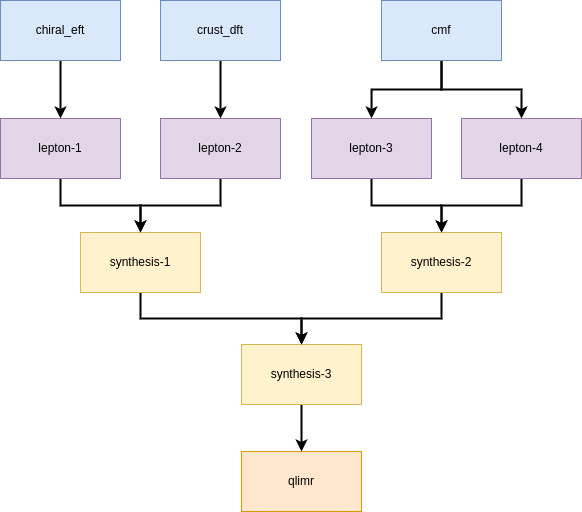
I’m learning how to use MUSES CE to perform simulations for my PhD thesis. The problem is that I’m probably not understanding how to run correctly Crust DFT module with Lepton module, and so also with the others.
I already read the documentation multiple times, but maybe I missed something.
If anyone will help me, I’ll be extremely thankful.
I’m using the Gooey. I already read pretty much everything, trying to follow the tutorials.
I have two problems:
Crust-DFT module requires an input file I probably did’t understand what it is
There’s only one output file, so I did’t understand how to link Crust-DFT with Lepton
Also, I tried to use Gooey to generate a NS model with Chiral (+ lepton) and CMB (+ lepton), but the synthesis module (connected well) is always giving me problems.
Sharing the workflow config will make it easier to troubleshoot. The Gooey offers a config preview text box, or the job results page also displays the config YAML text. Paste this into a formatted code block in your post
For crust-DFT, in the Connect modules section, select Uploads, and click on Select an upload - you’ll see a list of files, and some of them have a path/public_data/eos_tables/du21/*. Most of these are inputs for crust-DFT with different EOSs. Try out the ones starting with large_mmax or fid.
To connect with Lepton, add the crust-DFT module, and then on Connect modules, select the only Crust-DFT output you’ll see for the Lepton input_eos.
For us to help with Synthesis, please follow Andrew’s advice and paste the config you used.
I solved the problem I had with Crust-DFT. This is the workflow I tried to use now, here’s the failure message: Error in module synthesis: Internal failure. Code: 400, Message: Error executing attach.Error reading EoS files. One or both files are empty. Exiting.
Also, when I try to read the beta_equilibrium_eos.csv I get a page saying Internal Server Error
EDIT: I ran some checks using mini workflows (ChEFT+lepton, Crust-DFT+lepton and CMF+lepton), and then downloaded the output files. The server error occurs for the beta_equilibrium_eos.csv file from the CMF+lepton mini workflow, even if there were no failure messages. I was able to open and download the beta_equilibrium_eos.csv file foe ChEFT+lepton and Crust-DFT+lepton without problems.
I ran the same workflow and reproduced your results.
The physics experts are away this week and next at a workshop or conference, unfortunately, but I have a suspicion that the error might be in the Lepton configuration. There is a generate_table: false in crust_dft-1 that may be omitting the production of the file you need. I’m trying it with that set to true.
Side note: You are using a chain structure, and while it is valid and should not be causing the failure, there is a more efficient structure that supports parallelism for faster execution. See this example for a pattern to follow.
This is a bug in the CE we should fix. It will look better for our open source project if you create the issue instead of me. If you prefer not to do that, no worries.
Following the data flow from your pipe definitions, I constructed an optimized workflow structure to minimize runtime. This fails much quicker than your linear workflow
Aside from parallelism, another benefit of using a workflow structure like this is that you can easily comment out components when debugging. For example, I commented out everything except the chiral_eft-lepton chain for one job, and then launched a second job including only the crust_dft-lepton chain, and a third job with the cmf-lepton-synthesis chain. These three jobs are running in parallel making it faster to determine exactly where failures occur, and hopefully make it clearly why.
Is it possible to see some results for neutron stars observables calculated with MUSES CE? Some test results, articles o whatever, since it’s now impossible to generate results by myself because of the Internal Server Error for lepton module for CMF
Federico, I’m happy it worked for Crust-DFT and chiral EFT. I believe your CMF run is failing because you do not have a sufficient grid in the Q-direction to compute beta-equilibrium. Could you try again with
With the parameters you suggested me I get this error: Error in module lepton: Internal failure. Code: 406, Message: Error calculating Beta Equilibrium. The interpolated EoS is not stable. Exiting.
Well, that’s an improvement . Your current issue is that Lepton is computing beta-equilibrium at fixed muB, and at low muB, varying muQ might give you a stable phase either on the low or the high nB range of the liquid-gas phase transition.
What this means is that the root solver is looking for one equilibrium point, but because we fed the interpolator two phases, you don’t know which one it’ll pick as the solution at each muB. This can give you an unstable EOS.
One way around is to compute the equilibrium in density, which you can do by setting in the Lepton config:
I already tried to change some parameters but I’m not solving it.
Also, while checking all the output files, I noticed that there are columns that are zero, Temperature included: What precautions should I take to obtain the temperature profile?
@federico.nola when you encounter a vague error like “Code: 500, Message: Internal error”, look through the execution logs to find more helpful information. For example, in your job 48af3cbe-f551-40ed-8e6a-fd8c8ac51e12 (which I can only see because I am an admin; most of the community members who can help you will not have access to that), the QLIMR log.json file shows:
[
  "Job \"48af3cbe-f551-40ed-8e6a-fd8c8ac51e12\": Celery task \"d6fe52d9-8aba-46ad-ac90-4ee347b2dafb\" triggered for task \"qlimr-1\" running module \"qlimr\".",
  "\u001b[1;31mError: \u001b[0mThe provided EoS is not monotonically increasing, and execution has been stopped.",
  "",
  "Error: "
]
Obnoxious JSON formatting aside, it gives a clue as to the cause: “The provided EoS is not monotonically increasing, and execution has been stopped.”
(This should be handled better by the QLIMR module, which should catch this error and ensure the message is returned to the CE so that you see it instead of the vauge 500 error: @carlosc7)
Side note: In this scenario, where you have used one (often expensive) workflow to generate some data, like the eos.csv file in your case, and then you want to run various workflows that use this as their input, you don’t need to download and upload the file. Instead, you can save the job that generated the EoS and then directly reference its output in subsequent workflows; for example:
Marking a job saved or public requires this endpoint retroactively: PATCH /api/v0/ce/job/{id}/
or you can proactively flag it to be saved upon completion using the workflow.options.save_job boolean in the job creation API POST /api/v0/ce/job/.
(@mrpelicer this is not documented well if at all, by the way. The difference needs to be articulated between setting “saved” to true upon job creation and the “options” setting it to “saved” only after it completes successfully. Update: I made a code issue to track the task.)
To complement Andrew’s answer, it is indeed quite hard to ensure that a matched EOS is stable and monotonically increasing. This is exactly what we explored in this paper, which you should be able to reproduce using these notebooks.
tells me you are attaching the EOSs at muB=1300 instead of smoothly matching them. This is quite a high muB, so if the crust model has a higher pressure than the core model, it will lead to an unstable EOS - which if I remember correctly, is the case with CMF and crust-DFT.
Yes, matching the EOS is very model dependent. I suggest you plot the EOS and check if dP/de < 0 at any point. That’ll tell you if the issue is with the CMF EOS itself or with the way you matched them.

 you create the issue