Dear all,
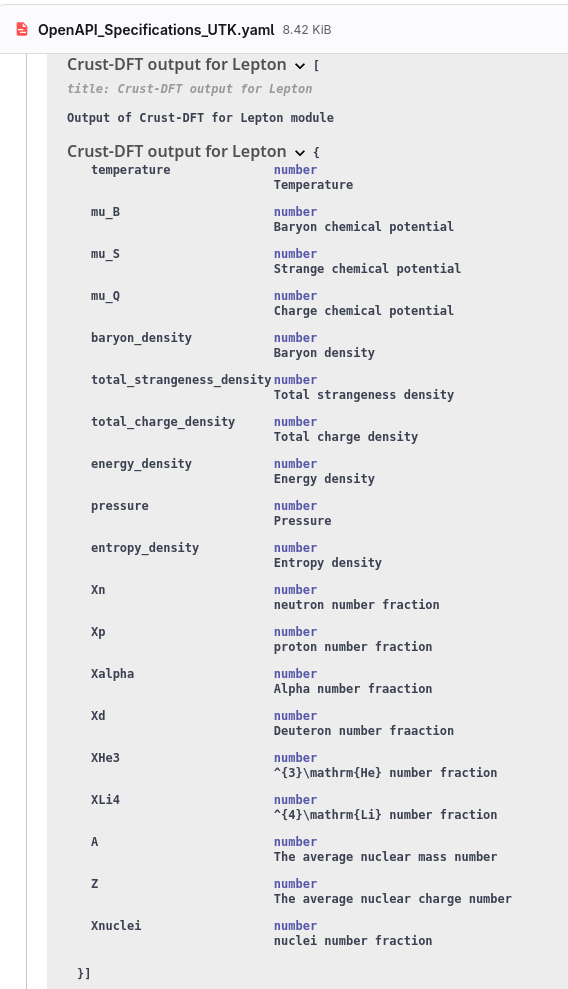
the Crust DFT module guide states that the crust_dft.csv output contains 10 columns. However, when I open the file, I find 19 columns. I’d like to know what the other 9 columns correspond to.
Thank you very much.
Dear all,
the Crust DFT module guide states that the crust_dft.csv output contains 10 columns. However, when I open the file, I find 19 columns. I’d like to know what the other 9 columns correspond to.
Thank you very much.
In looking at the Crust DFT documentation I also notice that there are obsolete links, for example to the “first release” of data tables, because https://isospin.roam.utk.edu went offline after Dr. Steiner left UTK and his online resources were terminated.
@federico.nola if your inquiry leads to creating an issue perhaps you should include the broken links in your report.
It’s true that the links don’t work, but I was asking for clarification regarding the Crust DFT output file. Looking at the documentation, it says
The output crust_dft.csv in the output folder contains: temperature, muB, muS, muQ, vector_density, total_S_density, total_Q_density, energy, pressure, entropy.”
These are 10 columns. However, when opening the file, there are 19 columns. I’d like to know what the other 9 columns not mentioned in the guide correspond to.
You can find a crust_dft file attached.
Thank you
crust_dft.csv (7.2 MB)
After this sentence there is a link to a more technical schema definition which has a section for /output/crust_dft.csv that includes the other parameters.
Side note: The module docs point unfortunately to an outdated GitHub repo that is not obviously associated with Crust DFT; the correct link is in the module list. Clearly the Crust DFT docs need improvement.
I was simply noting the broken links for reference so we might remember to fix them.